 ChatMD
What a seat is
One PC using Studio at a time. Add each PC with the key or a code from your team’s page. When a PC leaves, remove it there, and its seat is free for the next one.
Business
A business licence for ChatMD Studio: one key, a seat for every PC, the company named on it. Reassign seats as staff change, buy more when the team grows, and manage it all from one page.
BUSINESS LICENCE
Payment is handled by Stripe. Your key and receipt arrive by email.
By buying, you agree to the Terms of Use, including “Business licences”, for your organisation.
One PC using Studio at a time. Add each PC with the key or a code from your team’s page. When a PC leaves, remove it there, and its seat is free for the next one.
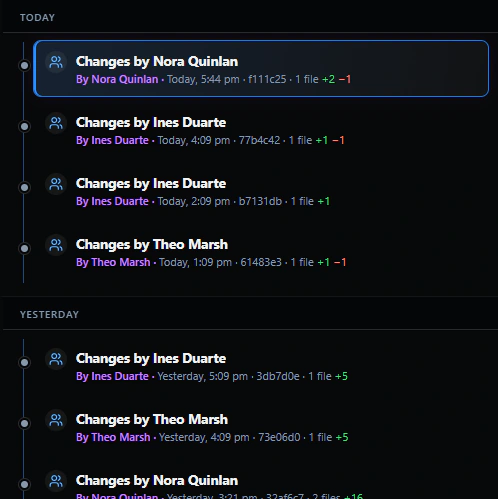
Switch a folder your team already shares (OneDrive, SharePoint, Dropbox or a network drive) to a team folder. Colleagues’ saves appear in your open notes, you see who else has a note open, and nothing is overwritten without asking. With local history on, Changes names who saved each change made in ChatMD.
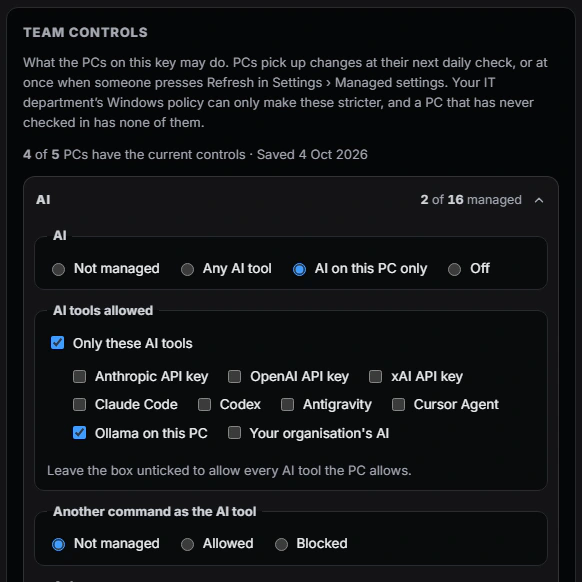
Set what every PC on your licence may do from your team page or through Windows policy: AI on, off or on this PC only, which AI tools, and web clipping. Keys verify offline. Read the IT deployment guide for the Windows policy templates and what each PC sends over the network.
Already have a business licence? Manage your team: see which PCs use it, free a PC, buy more seats, find your invoices.
The organisation holds the licence and its staff use it on the organisation’s behalf. Buying for yourself? Studio for one person is $24.99 once for up to three of your PCs. The details are in the Terms.